Embed code
This code is available from the export modal of any agenda published on OpenAgenda. It allows you to easily integrate a functional agenda with filters, list view, and detail view on a website.
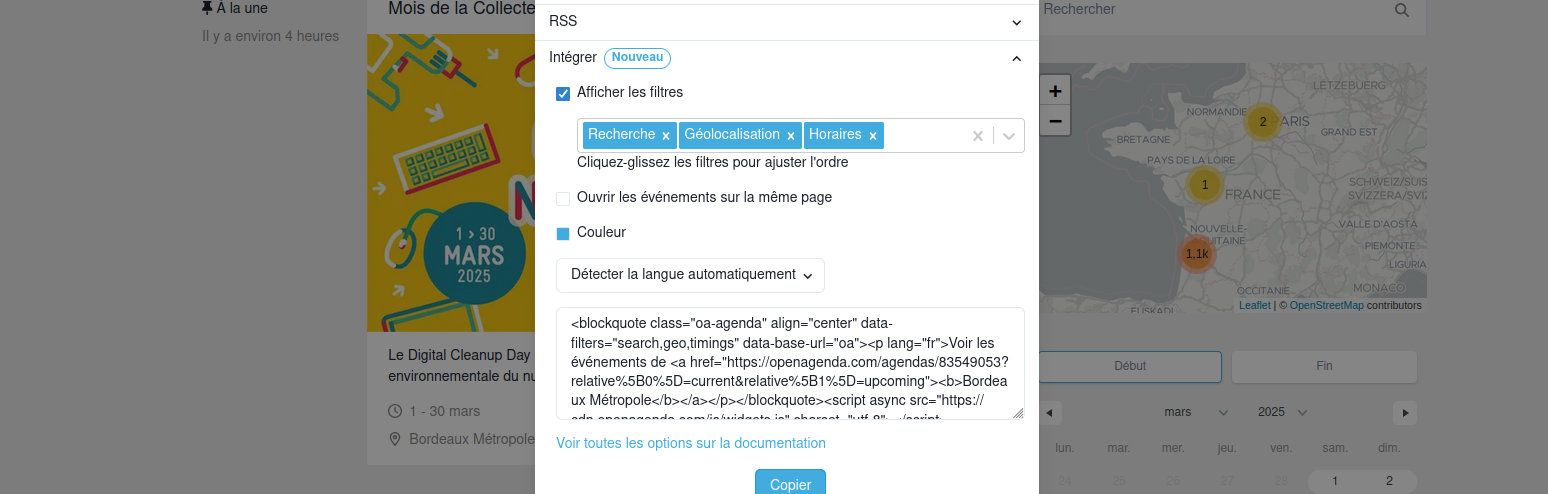 Agenda export modal
The modal allows the most common adjustments. This documentation goes further by supplementing the code with parameters whose behavior is detailed in the following section. Two use cases follow that illustrate how to achieve certain results:
- How to avoid cropping images in list view.
- How to create 2 code variants to allow navigation from a preview on a site's homepage to an agenda page showing the full program.
Parameters
Exhaustive list of code configuration parameters.
Specifying the URL of the page hosting the agenda
Attribute: data-base-url
This attribute specifies the agenda page to which users will be directed when clicking on an event in the list.
Important: The specified URL must point to an existing agenda implementation: the embed code simply redirects the visitor clicking on an event thumbnail to this link, supplemented with the event's URL code. This behavior is compatible with an implementation made with the Drupal module or the agenda-portal library.
By adding the attribute data-base-url="https://mon-site.com/agenda" to the <blockquote> of the embed code, events will be opened in a new tab at the page https://mon-site.com/agenda/slug-evenement.
Example:
<blockquote
  data-base-url="https://mon-site.com/agenda"
  class="oa-agenda"
  align="center"
>
  <p lang="fr">Voir les événements de
    <a
      href="https://openagenda.com/agendas/5109558?relative%5B0%5D=current&relative%5B1%5D=upcoming">
      <strong>Fête de la musique 2024</strong>
    </a>
  </p>
</blockquote>
<script async src="https://cdn.openagenda.com/js/widgets.js" charset="utf-8"></script>
By specifying oa as the value instead of a URL, the visitor will be redirected to the event detail on openagenda.com
Specifying the opening mode for clicked events
Attribute: data-base-url-target
This attribute specifies whether an event should open in a new tab, the parent page, or the topmost document if there are multiple iframe levels. Possible values are _blank, _parent, _top.
<blockquote
  data-base-url="https://mon-site.com/agenda"
  data-base-target="_blank"
  class="oa-agenda"
  align="center"
>
  <p lang="fr">Voir les événements de <a
    href="https://openagenda.com/agendas/5109558?relative%5B0%5D=current&relative%5B1%5D=upcoming"
      >
          <strong>Fête de la musique 2024</strong>
      </a>
  </p>
</blockquote>
<script async src="https://cdn.openagenda.com/js/widgets.js" charset="utf-8"></script>
Choosing displayed filters
Attribute: data-filters
This attribute defines the list of filters to display in the integration. The codes to provide, separated by commas, are the same as those used in URLs when filters are activated on the agenda homepage or in its administration.
Example:
<blockquote
  class="oa-agenda"
  align="center"
  data-filters="search,geo,timings,themes,publics"
>
  <p lang="fr">Voir les événements de
    <a href="https://openagenda.com/agendas/64168411?relative%5B0%5D=current&relative%5B1%5D=upcoming">
      <b>Limoges</b>
    </a>
  </p>
</blockquote>
<script async src="https://cdn.openagenda.com/js/widgets.js" charset="utf-8"></script>
Choosing the primary color
Attribute: data-primary-color
This attribute specifies a primary color that will be used in the integration.
Example where the chosen color is bright orange (#FF5733)
<blockquote
  class="oa-agenda"
  align="center"
  data-primary-color="#FF5733"
>
  <p lang="fr">Voir les événements de
    <a href="https://openagenda.com/agendas/64168411?relative%5B0%5D=current&relative%5B1%5D=upcoming">
      <b>Limoges</b>
    </a>
  </p>
</blockquote>
<script async src="https://cdn.openagenda.com/js/widgets.js" charset="utf-8"></script>
Adjusting map dimensions
Attribute: data-map-size
Allows specifying a height or ratio for the map.
- height: For a fixed height (e.g.:
data-map-size="height:400px") - ratio: To maintain a ratio (e.g.:
data-map-size="ratio:16/9") - maxHeight: With ratio, limit to a maximum height (e.g.:
data-map-size="ratio:16/9;maxHeight:400px"
Adjusting the number of events loaded per page
Attribute: data-page-size
By default, 12 events are loaded.
Choosing event sort order
Attribute: data-sort
Allows specifying the sort order of displayed events. The list of possible values is given here.
Note: when a text search is performed, the sort order changes and results are displayed in order of relevance.
Hiding the location on the thumbnail
Attribute: data-hide-location
Useful for venue agendas where the address is always the same and mentioning the location is redundant.
Hiding the logo
Attribute: data-logo
Allows hiding the OpenAgenda logo when the value "hide" is provided to the attribute.
Total display
Attribute: data-display-total
Specifies whether the total number of displayed events should appear at the top of the list. It is displayed by default. Specify "0" to hide it.
<blockquote
  class="oa-agenda"
  align="center"
  data-display-total="0"
>
  <p lang="fr">Voir les événements de
    <a href="https://openagenda.com/agendas/64168411">
      <strong>Limoges</strong>
    </a>
  </p>
</blockquote>
<script async src="https://cdn.openagenda.com/js/widgets.js" charset="utf-8"></script>
Displaying an export menu
Attribute: data-export-modal
Displays an "Export" link at the top of the list that shows a modal offering exports in several formats: PDF, spreadsheet, ics... Specify "1": data-export-modal="1"
Image presentation
Attribute: data-image-list
Controls the appearance of images displayed in the widget. Multiple values affecting different aspects of images can be specified. They must be separated by a semicolon ;.
containorcover: Corresponds to the CSSobject-fitproperty.ratio: Defines the aspect ratio viaaspect-ratio(example:ratio:1for a square).maxHeightorheight: Controls the maximum or fixed height viamax-heightorheight(example:maxHeight:400px).
In the example below, images will use contain mode to preserve their proportions and will have a maximum height of 400 pixels.
<blockquote
  class="oa-agenda"
  align="center"
  data-image-list="contain;maxHeight:400px"
>
  <p lang="fr">Voir les événements de
    <a href="https://openagenda.com/agendas/64168411?relative%5B0%5D=current&relative%5B1%5D=upcoming">
      <b>Limoges</b>
    </a>
  </p>
</blockquote>
<script async src="https://cdn.openagenda.com/js/widgets.js" charset="utf-8"></script>
In the next example, images will be displayed in cover mode with a square aspect ratio (1:1).
<blockquote
  class="oa-agenda"
  align="center"
  data-image-list="cover;ratio:1"
>
  <p lang="fr">Voir les événements de
    <a href="https://openagenda.com/agendas/64168411?relative%5B0%5D=current&relative%5B1%5D=upcoming">
      <strong>Limoges</strong>
    </a>
  </p>
</blockquote>
<script async src="https://cdn.openagenda.com/js/widgets.js" charset="utf-8"></script>
Minimum thumbnail width
Attribute: data-item-min-width
In px. Sets the minimum width of an event thumbnail in list view. Example: data-item-min-width="200px".
Use cases
Avoiding image cropping in list view
By default, the image format is cropped to normalize the height of thumbnails displayed in list view.

To display images in an uncropped format, simply add a parameter to the code specifying the display mode and the maximum image height: data-image-list="contain;maxHeight:400px"
Displaying a preview on your homepage linking to a full version on an agenda page
The embed code allows you to simply display a selection of events as a preview on your homepage that, when clicked, redirect to an agenda page presenting a more complete program.
To create a preview, 3 parameters - documented in detail in the previous section - will be useful:
data-display-total: set to "0" to hide the total in the previewdata-base-url: to target the page where the agenda is presented&size=3in the agenda link to show only 3 events in the preview
Here is a code snippet that can be placed on an agenda's homepage. It will redirect users to an /agenda page where the full embedded agenda code has been placed:
<blockquote
  class="oa-agenda"
  align="center"
  data-base-url="/agenda"
  data-display-total="0"
>
  <p lang="fr">Voir les événements de
    <a href="https://openagenda.com/agendas/64168411?size=3">
      <strong>Limoges</strong>
    </a>
  </p>
</blockquote>
<script async src="https://cdn.openagenda.com/js/widgets.js" charset="utf-8"></script>
Configuring the OpenAgenda widget manager
The simplest way to create an OpenAgenda widget for websites (an agenda, an event) is to copy and paste the HTML code generated in the export modal.
For optimal performance and reliability, include the widgets.js script in your template
Include the OpenAgenda widget manager once in your page template to optimize your web page performance.
If your site uses multiple widgets, you can configure OpenAgenda widgets once across your pages, which will make your site faster.
<script>window.oa = (function(d, s, id) {
  var js, fjs = d.getElementsByTagName(s)[0],
    t = window.oa || {};
  if (d.getElementById(id)) return t;
  js = d.createElement(s);
  js.id = id;
  js.src = '/index.js';
  js.async = true;
  fjs.parentNode.insertBefore(js, fjs);

  t._e = [];
  t.ready = function(f) {
    t._e.push(f);
  };

  return t;
}(document, 'script', 'oa-wjs'));</script>
This code snippet optimizes loading as follows:
- Assigns a unique HTML identifier (ID),
oa-wjs, to the element to easily check if the JavaScript file is already present on the page. If this ID already exists, loading is stopped immediately. - Loads the OpenAgenda JavaScript asynchronously to improve website performance.
- Initializes an asynchronous function queue to store dependent functions until the script is available.
- Place this snippet before any other JavaScript on your page that might depend on the
oa.readyasynchronous function queue.
Ignoring script tags from integrations
If you include the Twitter JavaScript loader on every page, you do not need to include the <script> element generated by an export modal. You can remove the additional <script> element from the generated HTML.
Initializing embedded content after page load
Most OpenAgenda integrations will be well served by the recommended embed code found in the export modal, but you may want to optimize how and when the OpenAgenda JavaScript widgets parse the page DOM to discover new HTML elements eligible for widget enhancement.
If content is dynamically inserted into a page (for example, with lazy loading or using a pushState technique to navigate between pages), it is necessary to parse the new widgets using the oa.widgets.load() function.
oa.widgets.load();
Called without arguments, widgets-js will search the entire document.body DOM tree for uninitialized widgets. For better performance, pass an HTMLElement object to restrict the search to only the children of that element.
Example:
oa.widgets.load(document.getElementById("container"));
System events
Waiting for asynchronous resources
Loading the widgets.js file asynchronously will require waiting before binding events: the functions you call do not yet exist. You will need to wrap your event bindings in a callback function such as the oa.ready asynchronous function queue, which will be invoked once everything is loaded.
oa.ready(function (oa) {
  // ...
});